Code Without a Keyboard
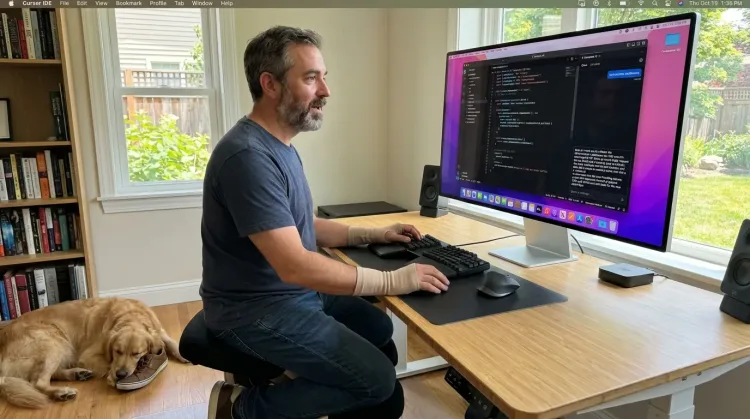
Voice-prompt AI coding agents like Cursor and Claude Code. With Ottex handling dictation and AI handling the code, you can architect and ship features with almost zero typing. Perfect for RSI recovery or accessibility.
How it works
Same mic. Different outputs. Your rules.
Hey Tom,
Let's meet at the office tomorrow at 10 a.m. to prepare the presentation.
Press a hotkey
Hit your shortcut in any app. Ottex is ready where you work, without switching windows or breaking your flow.
Say the intent
Speak naturally. Ottex keeps exact dictation when speed matters and applies the right workflow when structure matters.
Get the right output
Ready draft in Gmail. Exact words in ChatGPT. Structured ticket in Linear.
Press a hotkey
Hit your shortcut in any app. Ottex is ready where you work, without switching windows or breaking your flow.
Say the intent
Speak naturally. Ottex keeps exact dictation when speed matters and applies the right workflow when structure matters.
Hey Tom,
Let's meet at the office tomorrow at 10 a.m. to prepare the presentation.
Get the right output
Ready draft in Gmail. Exact words in ChatGPT. Structured ticket in Linear.
Features for hands-free coding
Everything you need to do this job efficiently
3x Faster Than Typing
Speak 150+ words per minute vs 40 wpm typing. Finish tasks in a third of the time.
Works in Any App
System-wide on macOS—Ottex works wherever you can type. No app-specific integrations needed.
Global Shortcuts
Start recording with Option+D, use Push-to-Talk, or cancel with Esc. All shortcuts are fully configurable.
Voice Corrections
Say 'scratch that' to delete mistakes, 'actually' to rephrase. Fix errors without stopping your flow or touching the keyboard.
Precision Typing
Say 'new paragraph', 'open quote', 'em dash', 'ellipsis'. Full formatting control by voice.
Who uses this?
Professionals who rely on Ottex for hands-free coding
Frequently asked questions
Can I really code without typing?+
With AI coding agents, yes. Speak your architectural decisions, describe the changes you need, and let Cursor or Claude Code write the code. Ottex handles the dictation, AI handles the implementation.
Does it understand programming concepts?+
Yes. Add your project's terms, library names, and API references to your custom dictionary. Ottex transcribes technical prompts — 'refactor the auth middleware to use BetterAuth' — accurately.
How much can I reduce my typing?+
Users with RSI report reducing keyboard use by 90-95%. Voice prompts handle the creative and architectural work; you only type for small edits and navigation.
Does it work with Cursor, VS Code, and terminal?+
Yes. Ottex types into any text field on macOS — Cursor's Composer panel, VS Code's Copilot Chat, terminal for Claude Code, or any IDE.
Related use cases
Other ways to use Ottex
Capture Ideas Quickly
Speak ideas the moment they hit you. Use Ottex anywhere to capture thoughts, then refine them later.
Write Meeting Notes
Dictate meeting notes in real-time or right after. Capture action items, decisions, and key points while they're fresh in your mind.
Write Research Notes
Dictate research notes, literature summaries, or analysis. Capture your thinking process without losing momentum to typing.
Write Scripts
Write video scripts, podcast outlines, or screenplays by voice. Speaking your dialogue makes it sound natural from the start.
Voice input that follows your rules.
Get 4+ hours back every week from typing, formatting, and re-prompting AI.
Try for freeNo credit card required.